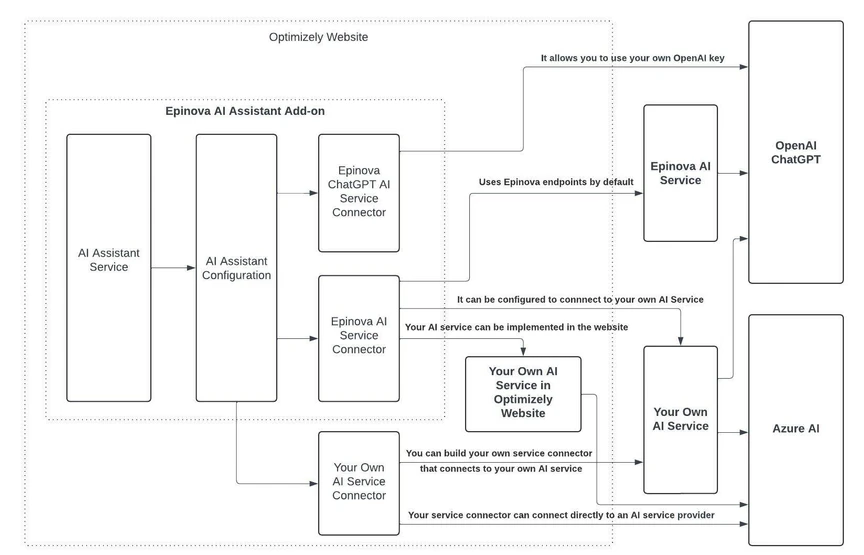
Use EpinovaAiServiceConnector to connect to your AI service middle layer.
EpinovaAiServiceConnector is a built-in service connector that enables the connection between the AI Assistant add-on and an AI service. To integrate your own AI service, simply configure the URLs to your APIs in the appsettings.json.
Configure the API URLs in appsettings.json
"Epinova": {
  "AiAssistantOptions": {
    "ServiceApiBaseUrl": "https://your-ai-service-domain",
    "SuggestTextApiUrl": "your-suggest-text-api-url",
    "SuggestTextAsStreamApiUrl": "your-suggest-text-as-stream-api-url",
  }
}SuggestTextApiUrl: The URL used to return text to the add-on, for example, api/Suggest.SuggestTextAsStreamApiUrl: The URL used for streaming text to the add-on, for example, api/SuggestAsStream.
AI Service
The service must expose two APIs: one for retrieving generated text as a stream and another for obtaining text via an HTTP JSON response.
Both APIs use the HTTP POST method and accept the same input:
{
  "aiServiceType": "integer",
  "requestId": "string",
  "text": "string",
  "content": "string",
  "image": "string",
  "model": "string",
  "instruction": "string",
  "instructionType": "string",
}aiServiceType: To generate text from an image, use theAiServiceType.Visiontype, which has a value of 1. Otherwise, use theAiServiceType.TextGenerationtype.
public enum AiServiceType
{
    TextGeneration = 0,
    Vision = 1
}requestId: A unique identifier for the request, typically represented as a GUID string.text: The prompt text, for example, "Summarize the following text"content: The text content provided, corresponding to the prompt, for example, "the following text" in the prompt above.image: When using the Vision type, this is an embedded Base64 URL of the image, for example,data:image/jpeg;base64,[Base64_Content].model: The AI model used for processing this request.instruction: The type of instruction or prompt.
public static class AiInstructions
{
    public const string Suggest = "Suggest";
    public const string FixSpelling = "Fix Spelling";
    public const string Translate = "Translate";
    public const string Summarize = "Summarize";
    public const string MetaDescription = "Meta Description";
    public const string MetaTitle = "Meta Title";
    public const string Introduction = "Introduction";
    public const string AltText = "Alt Text";
}instructionType: A general type of the instruction.
public static class AiInstructionTypes
{
    public const string Suggestion = "AiSuggestion";
    public const string SuggestionFromSources = "AiSuggestionFromSources";
    public const string SuggestionFromImages = "AiSuggestionFromImages";
    public const string FixSpellingAndGrammar = "AiFixSpellingAndGrammar";
    public const string Translation = "AiTranslation";
}
Use EpinovaOpenAiServiceConnector to connect directly to your OpenAI API.
To use EpinovaOpenAiServiceConnector, you must have an OpenAI API key. If you don’t have one, you can create an account and obtain a key at OpenAI Platform .
Configure the API key in appsettings.json
"Epinova": {
  "OpenAi": {
    "ApiKey": "your-chatgpt-api-key"
  }
}
Update Startup.cs to use EpinovaOpenAiServiceConnector
services
    .AddAiAssistant()
    .UseServiceConnector<EpinovaOpenAiServiceConnector>();