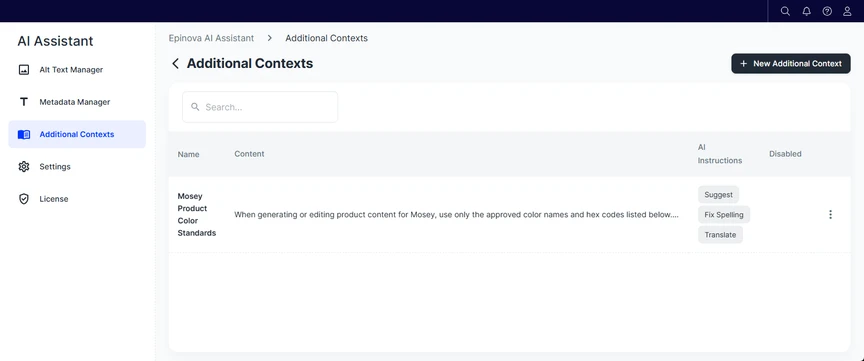
Each additional context consists of contextual content that is automatically applied only to selected AI instruction types (for example, Meta Title, Translate, or Summarize). This makes it possible to tailor AI behavior per use case, such as SEO optimization, tone control, language rules, or editorial standards.
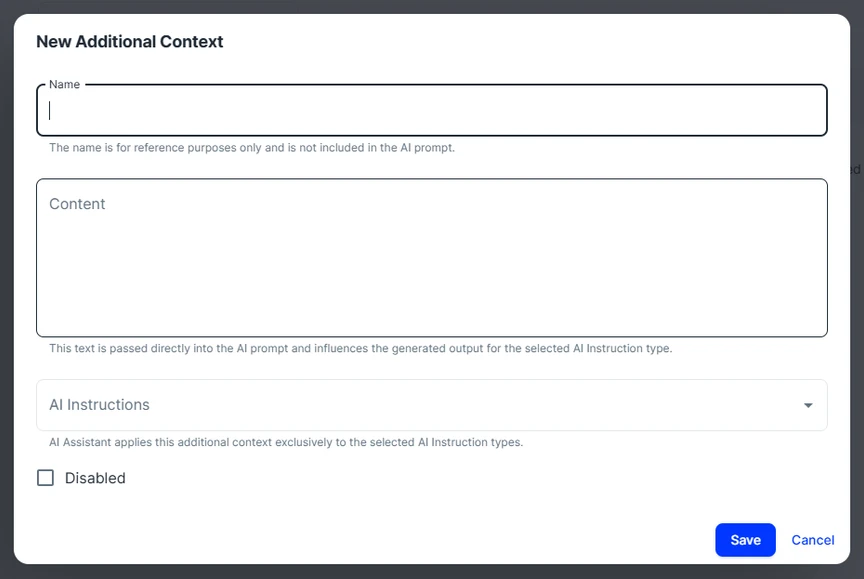
To create a new additional context, click New Additional Context and configure the name.
Key Concepts
Name
- Used only for internal reference in the UI.
- Not included in the AI prompt.
- Should be descriptive and easy to identify (for example, Swedish Translation Guidelines).
Content
- The actual contextual instructions passed directly to the AI.
- Influences how the AI generates output.
- Should be written clearly and explicitly, as if instructing a human editor.
AI Instructions
- Defines when the additional context is applied.
- The context is used exclusively for the selected instruction types (for example, Meta Description or Translate).
- Multiple additional contexts can coexist, each targeting different instruction types.
- AI instruction types:
- Alt Text: The additional context will be applied during alt text generation in both the CMS Gadget and the Alt Text Manager.
- Fix Spelling: The additional context is applied when correcting spelling in the CMS Gadget.
- Introduction: The additional context is used when generating introductions in the CMS Gadget.
- Meta Title: The additional context is used when generating meta titles in the CMS Gadget and Metadata Manager.
- Meta Description: The additional context is used when generating meta descriptions in the CMS Gadget and Metadata Manager.
- Suggest: The additional context guides the general suggestion of generation in the CMS Gadget.
- Summarize: The additional context is used in the general Summarize prompt in the CMS Gadget.
- Translate: The additional context is used in any translation prompt in the CMS Gadget, Alt Text translation, or the Language Manager add-on.
Disabled
- Temporarily turns the context off without deleting it.
Sample Additional Context
Business Context
Mosey (a fiction brand) is a fashion retailer selling seasonal apparel online. Product content must follow strict brand and catalog rules to ensure consistency across product pages, filters, and marketing channels.
In a fashion retail environment like Mosey, color names are not purely descriptive - they are part of the product catalog structure. Each color name must be consistent across product pages, filters, variants... Without predefined rules, AI-generated content may introduce alternative or creative color names that do not match the approved catalog, leading to inconsistencies and broken filtering.
Additional Contexts ensure that the AI Assistant uses only approved color names and mappings, preventing variations such as synonyms or informal descriptions. This ensures consistent product classification, dependable search and filtering, and reduces the need for manual corrections across all channels.
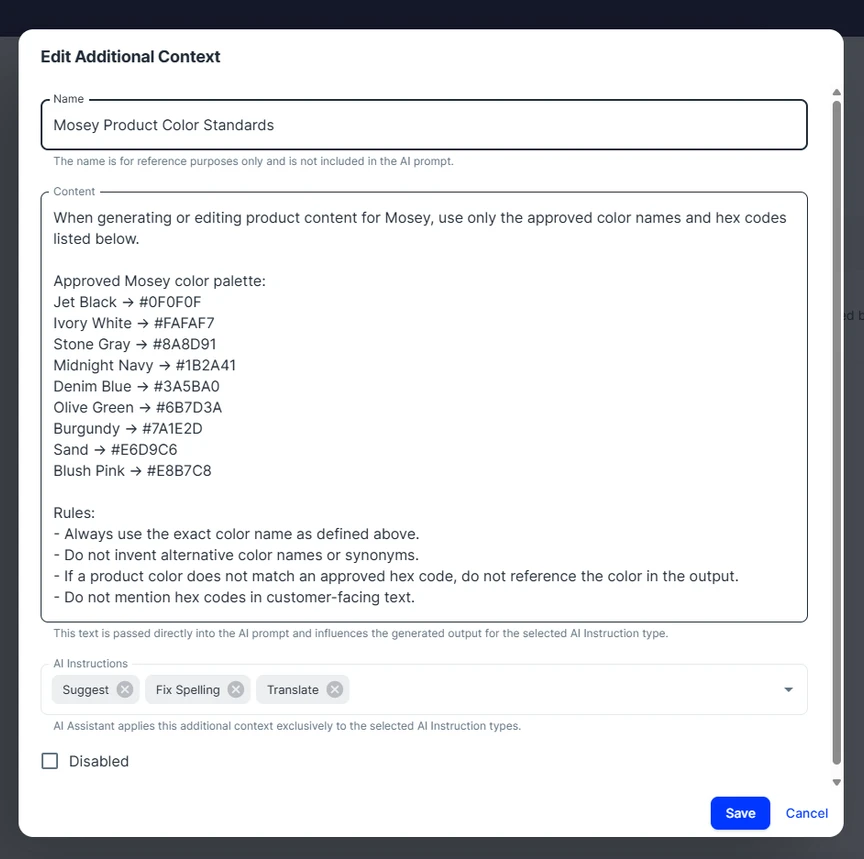
When generating or editing product content for Mosey, use only the approved color names and hex codes listed below.
Approved Mosey color palette:
Jet Black → #0F0F0F
Ivory White → #FAFAF7
Stone Gray → #8A8D91
Midnight Navy → #1B2A41
Denim Blue → #3A5BA0
Olive Green → #6B7D3A
Burgundy → #7A1E2D
Sand → #E6D9C6
Blush Pink → #E8B7C8
Rules:
Always use the exact color name as defined above.
Do not invent alternative color names or synonyms.
If a product color does not match an approved hex code, do not reference the color in the output.
Do not mention hex codes in customer-facing text.