Overview
The AI Traffic report helps you understand how visitors reach your website through recognized AI platforms, such as ChatGPT and Gemini.
It provides insights into traffic volume, engagement, and key events, allowing you to evaluate how effectively AI-referred visitors interact with your website.
Use this report to:
-
Monitor traffic from AI platforms over time.
-
Identify which AI sources contribute the most sessions.
-
Compare engagement and key event performance across AI sources.
-
Discover which pages attract AI-referred visitors.
-
Understand the geographic distribution of AI traffic.
Note: AI Traffic includes sessions attributed to identifiable AI sources in Google Analytics 4 (GA4). It does not represent every visit influenced by AI-generated answers or recommendations.
1. Open the AI Traffic report
-
Open AI Assistant Manager.
-
Navigate to Traffic Insights > Acquisition.
-
Select the AI Traffic tab.
-
Use the Sites selector to choose the website you want to analyze.
-
Select a reporting period using the Period selector.
The report automatically displays data for the selected website and reporting period.
2. Monitor AI traffic over time
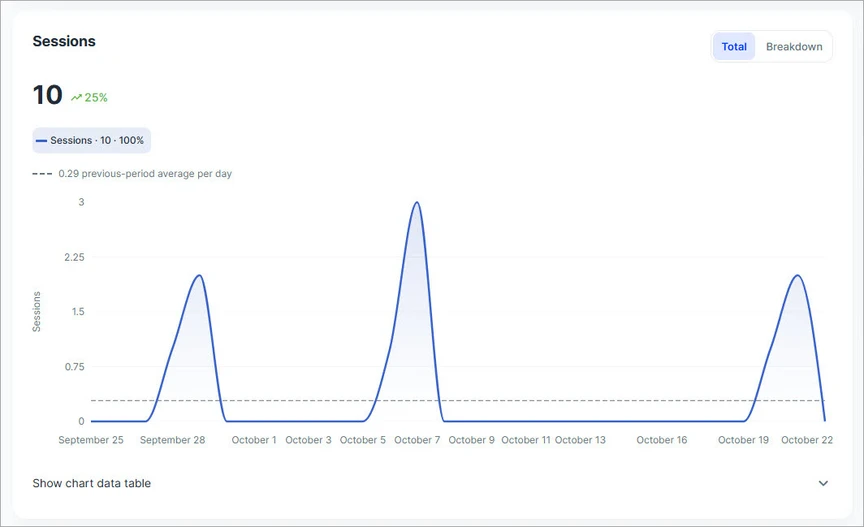
The Sessions chart provides an overview of traffic attributed to recognized AI sources during the selected reporting period.
Use this chart to identify traffic trends, monitor changes in AI referrals, and compare performance with the previous period.
Understand the chart
The chart includes the following information:
-
Sessions: The total number of sessions attributed to recognized AI sources during the selected period.
-
Change indicator: The percentage increase or decrease in sessions compared with the previous equivalent period.
-
Daily trend: The solid line represents the selected metric over time, helping you identify traffic increases, decreases, and periods of inactivity.
-
Comparison reference: The dashed line represents the previous period's daily average, providing a reference for evaluating current performance.
Customize the chart
Use the available controls to explore the data from different perspectives.
Total / Breakdown
Switch between the two chart views:
-
Total: Displays the overall trend for the selected metric.
-
Breakdown: Provides a more detailed view of the data, helping you compare individual contributors.
Metrics
Use the Metrics selector to change the metric displayed in the chart. This allows you to analyze different aspects of AI traffic without leaving the report.
Show chart data table
Expand Show chart data table below the chart to view the underlying values in a tabular format.
This is useful when you need to inspect individual data points or compare values more precisely.
Note: When traffic volume is low, even a small change in sessions can produce a large percentage increase or decrease. Always consider the actual session count when interpreting trends.
3. Identify top AI sources
The Top AI sources card highlights the AI platforms contributing the most traffic to your website.
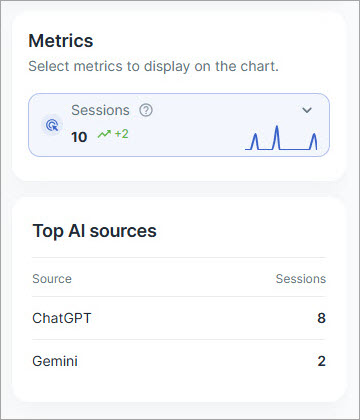
Sources are ranked by the number of sessions recorded during the selected reporting period.
Use this card to:
-
Identify the leading AI platforms referring visitors to your website.
-
Compare the relative traffic contribution of different AI sources.
-
Recognize emerging sources of AI traffic.
-
Monitor changes in the distribution of AI referrals over time.
The card provides a quick overview of where AI-attributed traffic originates. For more detailed engagement information, use the Source performance section.
4. Explore source performance
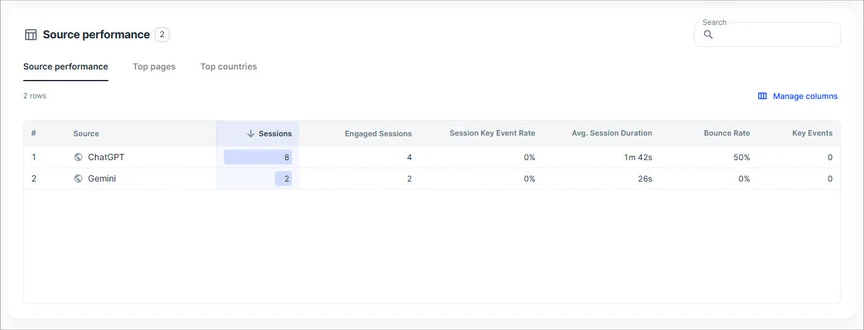
The Source performance section provides detailed information about traffic originating from recognized AI sources.
It allows you to compare acquisition, engagement, and key event metrics, as well as explore the pages and countries associated with AI-referred visits.
Three report tabs are available.
Source performance
The Source performance tab displays traffic and engagement metrics for individual AI sources.
Use this report to compare how visitors from different AI platforms interact with your website.
For example, you can evaluate whether a source generates a high number of sessions, attracts engaged visitors, or contributes to key events.
Top pages
The Top pages tab helps you identify which website pages receive traffic from AI sources.
Use this report to:
-
Discover content that attracts visitors from AI platforms.
-
Identify pages receiving the most AI-referred traffic.
-
Compare the performance of landing content.
-
Find opportunities to improve content engagement and key event performance.
This information can help you understand which content is being discovered through AI platforms and prioritize improvements to relevant pages.
Top countries
The Top countries tab shows the geographic distribution of visitors arriving through AI sources.
Use this report to:
-
Identify countries contributing the most AI-referred traffic.
-
Understand the geographic reach of your content.
-
Compare engagement across different countries.
-
Discover opportunities for localization or region-specific content improvements.
Search, sort, and customize the table
Use the table controls to explore the data more efficiently.
-
Search: Find specific entries in the current report.
-
Sort: Select a column heading to sort the results by that metric. Select it again to reverse the sorting direction.
-
Manage columns: Choose which available metrics appear in the table.
These controls help you focus on the information most relevant to your analysis.
5. Understand the performance metrics
The Source performance table includes metrics that help evaluate the volume and quality of AI-referred traffic.
| Metric | Description |
|---|---|
| Source | The recognized AI platform associated with the session. |
| Sessions | Total number of sessions attributed to the AI source during the selected reporting period. |
| Engaged Sessions | Number of sessions that lasted longer than 10 seconds, included at least one key event, or had at least two page or screen views. |
| Session Key Event Rate | Percentage of sessions in which at least one key event occurred. |
| Avg. Session Duration | Average duration of sessions attributed to the AI source. |
| Bounce Rate | Percentage of sessions that did not meet the criteria for an engaged session. |
| Key Events | Total number of times events marked as key events were triggered. |
How to interpret the metrics
Traffic volume
Use Sessions to understand how much traffic each AI platform contributes.
A high session count indicates that a source is referring visitors to your website, but it does not necessarily mean those visitors are engaging with your content.
Visitor engagement
Use Engaged Sessions, Avg. Session Duration, and Bounce Rate together to evaluate visitor engagement.
A source with fewer sessions may still provide valuable traffic if those visitors engage more actively with your website.
Key event performance
Use Key Events and Session Key Event Rate to understand whether AI-referred visitors complete important actions.
Key events depend on the configuration of your connected GA4 property and may include actions such as form submissions, registrations, or purchases.
A source with a relatively low number of sessions but a high session key event rate may provide valuable traffic.
Important: No single metric provides a complete picture of traffic quality. Compare session volume, engagement, and key event performance before drawing conclusions.
6. Evaluate AI-referred traffic
Follow this workflow to analyze AI traffic and identify opportunities for improvement.
Step 1. Select the website and reporting period
Choose the website you want to analyze and specify the reporting period.
Use consistent reporting periods when comparing performance over time.
Step 2. Review overall traffic trends
Examine the Sessions chart to understand the volume of AI-referred traffic.
Look for significant increases, decreases, or changes in traffic patterns.
Use the comparison indicator to evaluate performance against the previous period.
Step 3. Identify leading AI sources
Review Top AI sources to identify which platforms contribute the most visits.
Determine whether traffic is concentrated in a few platforms or distributed across several sources.
Step 4. Compare engagement performance
Open Source performance and compare the engagement metrics of individual AI platforms.
Pay particular attention to:
-
Engaged Sessions
-
Avg. Session Duration
-
Bounce Rate
-
Session Key Event Rate
-
Key Events
Use these metrics together to identify sources that generate meaningful visitor interactions.
Step 5. Analyze pages and geographic distribution
Open Top pages to identify content receiving traffic from AI platforms.
Then review Top countries to understand where those visitors are located.
These reports can reveal opportunities to improve content relevance, user experience, and localization.
Step 6. Monitor changes over time
Repeat the analysis periodically to track changes in AI traffic.
Compare reporting periods to evaluate whether content improvements, campaigns, or other website changes coincide with increased traffic, stronger engagement, or more key events.
7. Important considerations
Keep the following points in mind when interpreting the AI Traffic report.
AI traffic identification
AI Traffic relies on identifiable traffic-source information available in GA4. Visits without recognizable AI referral information may be categorized differently and may not appear in this report.
Traffic volume and percentage changes
Large percentage changes do not always indicate substantial traffic growth. When session counts are low, minor fluctuations can produce significant percentage differences.
Engagement versus session duration
A shorter average session duration does not automatically indicate poor engagement. Visitors may find the information they need quickly or complete an important action within a short session.
Key event configuration
Key event metrics depend on which events are marked as key events in the connected GA4 property. If no relevant key events are configured or recorded, the report may show zero key events even when visitors interact with your website.
Data interpretation
Use multiple metrics and reporting periods to evaluate performance. Avoid drawing strong conclusions from small datasets or isolated changes.
The AI Traffic report helps you understand how recognized AI platforms contribute to website traffic and engagement, providing a foundation for monitoring AI-driven discovery and improving content performance.