With our Proxima DAM Migration Tool, you can migrate everything from images, videos, documents, and other assets while maintaining important metadata and folder structures, critical for organizing content effectively. The result is a fast, accurate migration process that supports the centralization of content operations within the Optimizely platform.
The fastest and most secure way to migrate from ImageVault
Key features
Automated migration
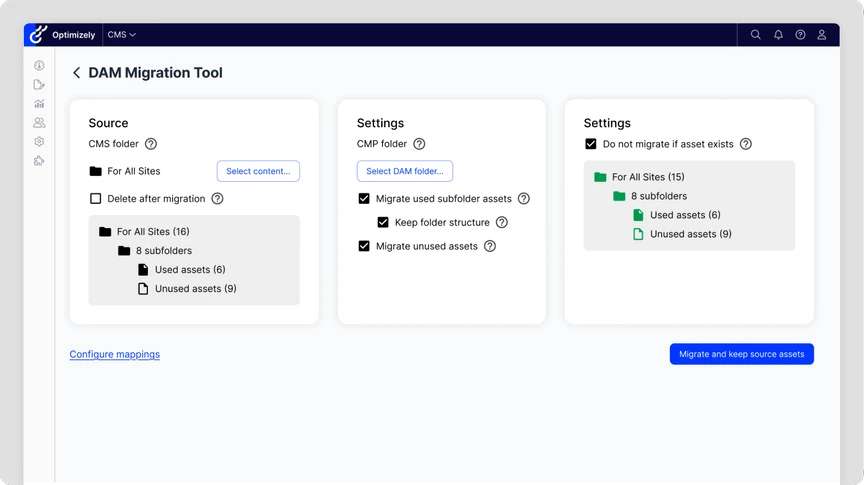
The Proxima DAM Migration Tool automates the entire process of transferring media assets from Optimizely CMS to the Optimizely CMP’s DAM system. This reduces the need for time-consuming manual work and the potential for errors.
Metadata preservation
One of the standout features is its ability to preserve metadata and folder structures during migration. This ensures that all important information and asset organization is retained, which is crucial for efficient content management.
Scalable
The tool is designed to handle large content libraries, making it ideal for organizations with extensive media assets that need to be migrated without compromising performance.
Flexible solution for digital assets
The Proxima DAM Migration Tool can be purchased as a standalone solution or as part of our Content Migration service, giving you the flexibility to choose what best fits your needs.
Access to both CMS and Optimizely CMP is required to use the DAM Migration Tool.
The value of the Proxima DAM Migration Tool
- Saving time and allowing teams to focus on other important tasks.
- Reducing human errors and ensuring that assets are transferred correctly every time.
- Accelerating CMP adoption and ensuring that content is seamlessly integrated into the platform without delays.
Documentation and Editor guides
Dive into our Proxima DAM Migration Tool and see how it works in practice. Access documentation, videos and editor guides to help your team make the most of it.
Take me to the product website where I can read more about DAM Migration